



Success Stories
Resources
- Partners
Company

How to enable native “Make a payment” link on SCA (SuiteCommerce Advanced) website for customers with terms and can pay an Invoice?
When the customers need to pay the invoice on the SuiteCommerce Advanced website, ask NetSuite Administrator to enable following configurations.
Enable checkbox “Allow Non-Credit Card Payment Methods During Checkout.” (Open website record. Click on Shopping Tab. Enable checkbox located underneath Payments Page)
Select Sales Order Type as “Per Customer Basis” from the checkout preference section.
Besides above two configurations, all the existing customers or new customers records must have standard payment terms set for invoice payment.
How to access “Make a payment” link from My Account page of SuiteCommerce Advanced Website?
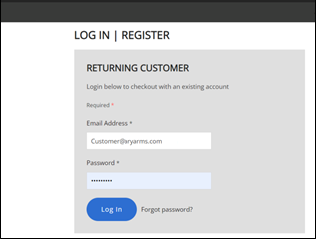
Visit SCA (SuiteCommerce Advanced) website and Login with your Username and Password in the Website
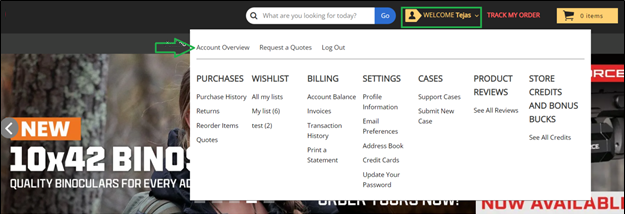
Navigate to My Account Section
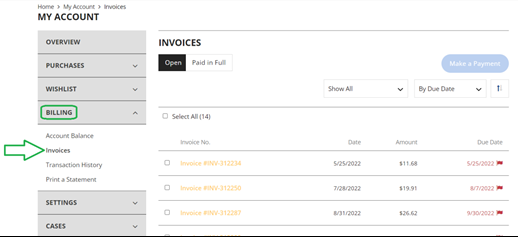
Navigate to Billing > Invoice Section
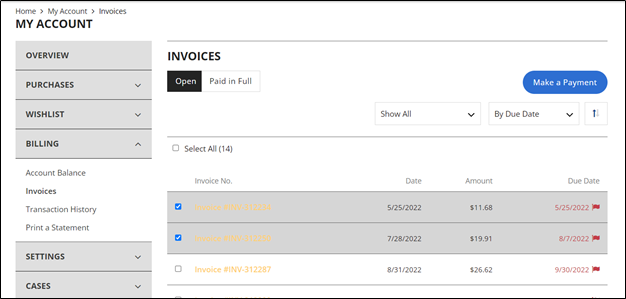
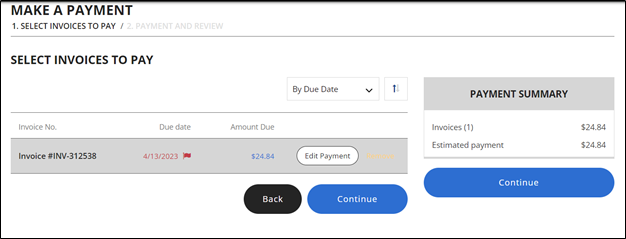
Select the Invoice from the List to Make a Payment. (Customer can select multiple invoices). Click on Make a Payment Button.
Verify invoice information and Click on Continue button. (Customer can edit invoice amount by clicking edit payment)
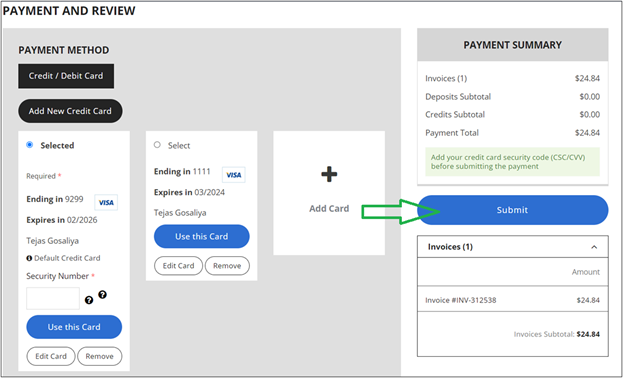
Customer will be redirected to Payment and Review Page. Customer can provide credit/debit card information and click on Submit button to make a payment. (Customer can also Add new credit/debit card in this section).
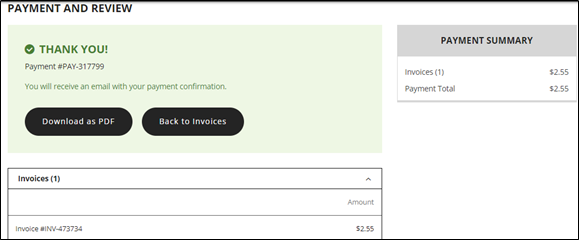
Once the form submitted, customer get thank you message for payment confirmation. Customer can download PDF copy of receipt.
If your team is looking for a more advanced solution, "Adding Payment Link to Invoice Document" or need help with configuring Cybersource Payment Profile or similar payment processor, please Contact Us to discuss how GIR Software Services can help to avoid customization for your business.
Why GIR Software Services?
As a leading NetSuite consulting firm, GIR Software Services enables your organization to create sustainable long-term business values. Our multi-talented team has technical and functional expertise that can help your business to implement NetSuite ERP solutions, EDI integrations, and implement an eCommerce website.
We can also provide managed NetSuite support services to build a strong foundation.
Learn more about us to see how GIR Software Services can help your business grow!
Recent Posts


 NetSuite Next Explained: What the AI-Powered ERP Upgrade Actually Means for Your Business
If you have been following Oracle’s announcements in 2025 and 2026, you have heard...