

Turning Manual Contract Tracking Into a Live, Automated NetSuite Report


- Contract details and Sales Order lines lived in separate areas of NetSuite ERP, with no automatic link between them.
- A single contract item could appear on multiple Sales Orders, making it difficult to add up the total quantity already committed.
- Items on Sales Orders were sometimes recorded at a variant level (for example, a specific bag size), while the contract was written at the product family level, so a simple item-to-item lookup would miss valid matches.
- Customer and Sales Rep information had to be verified separately, and the correct values were not always obvious when a contract had been partially fulfilled by a different business unit.
- The business had previously built a SuiteAnalytics Workbook to track contract utilization, but as the volume of contracts and Sales Order lines grew, the query became too slow to run reliably, making it impractical for day-to-day use.
- There was no built-in calculation for percentage utilization. Teams had to compute this manually, row by row.
Real-world impact
A contract for 300,000 lbs of Lysine might have quantities spread across a dozen Sales Orders, each referencing a slightly different item variant. Without a purpose-built tool, a team member would need to locate every relevant Sales Order, verify the item match, sum the quantities, and then calculate what remained, a process that could take hours and was prone to error.
- Contract details and Sales Order lines lived in separate areas of NetSuite ERP, with no automatic link between them.
- A single contract item could appear on multiple Sales Orders, making it difficult to add up the total quantity already committed.
- Items on Sales Orders were sometimes recorded at a variant level (for example, a specific bag size), while the contract was written at the product family level, so a simple item-to-item lookup would miss valid matches.
- Customer and Sales Rep information had to be verified separately, and the correct values were not always obvious when a contract had been partially fulfilled by a different business unit.
- The business had previously built a SuiteAnalytics Workbook to track contract utilization, but as the volume of contracts and Sales Order lines grew, the query became too slow to run reliably, making it impractical for day-to-day use.
- There was no built-in calculation for percentage utilization. Teams had to compute this manually, row by row.
Real-world impact
A contract for 300,000 lbs of Lysine might have quantities spread across a dozen Sales Orders, each referencing a slightly different item variant. Without a purpose-built tool, a team member would need to locate every relevant Sales Order, verify the item match, sum the quantities, and then calculate what remained, a process that could take hours and was prone to error.
- Active contract lines
- Sales Order quantities
Key principle: always live, never stale
The tool is built as a reusable artifact that any authorized user can open and run. It requires no spreadsheet maintenance, no manual lookups, and no formula work. Every time it is run, it fetches fresh data directly from NetSuite.

- Active contract lines
- Sales Order quantities
Key principle: always live, never stale
The tool is built as a reusable artifact that any authorized user can open and run. It requires no spreadsheet maintenance, no manual lookups, and no formula work. Every time it is run, it fetches fresh data directly from NetSuite.

| 1 | Retrieve active contracts. The tool pulls every active contract line from NetSuite, along with the associated contract name, dates, item, price, quantity, customer, and sales representative. |
| 2 | Retrieve Sales Order quantities. For each contract, the tool finds all related Sales Order lines and totals the quantities that have been committed, using absolute values to ensure accuracy regardless of how the order was recorded. |
| 3 | Match Sales Orders to contract items. A Sales Order line is considered a match if its item, or its item’s parent product, corresponds to the contracted item. This ensures variant items (for example, different bag or tote sizes of the same product) are correctly counted against the right contract line. |
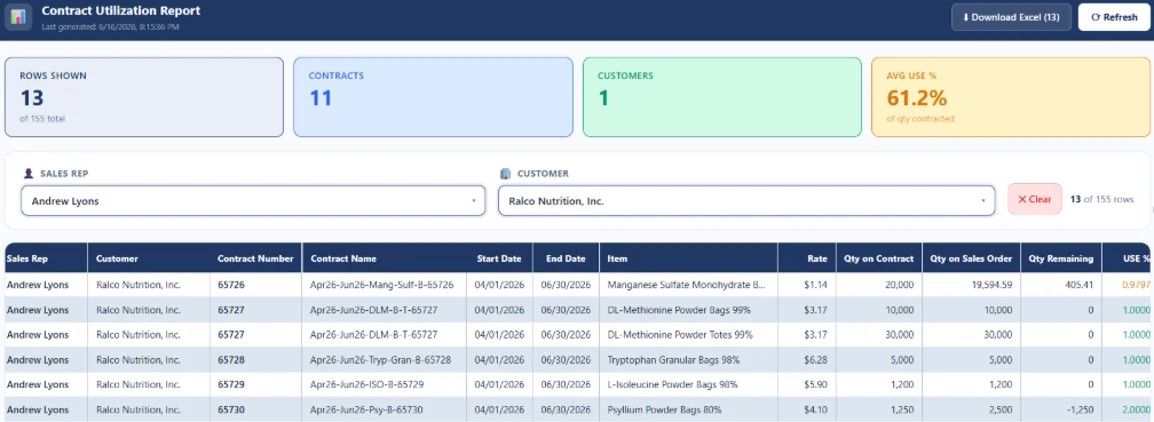
| 4 | Calculate utilization metrics. For each contract line, the tool computes Qty on Sales Order (total committed), Qty Remaining (contracted minus committed), and USE % (committed divided by contracted, shown as a plain decimal such as 0.6200). |
| 5 | Determine Customer and Sales Rep. Where a matching Sales Order exists, the customer and sales representative are taken from that Sales Order. |
| 6 | Present the report. Results are displayed in a clean table with navy headers, alternating row shading, and color-coded utilization values. Users can filter by Sales Rep or Customer and download the filtered view as a formatted Excel file. |
| 1 | Retrieve active contracts. The tool pulls every active contract line from NetSuite, along with the associated contract name, dates, item, price, quantity, customer, and sales representative. |
| 2 | Retrieve Sales Order quantities. For each contract, the tool finds all related Sales Order lines and totals the quantities that have been committed, using absolute values to ensure accuracy regardless of how the order was recorded. |
| 3 | Match Sales Orders to contract items. A Sales Order line is considered a match if its item, or its item’s parent product, corresponds to the contracted item. This ensures variant items (for example, different bag or tote sizes of the same product) are correctly counted against the right contract line. |
| 4 | Calculate utilization metrics. For each contract line, the tool computes Qty on Sales Order (total committed), Qty Remaining (contracted minus committed), and USE % (committed divided by contracted, shown as a plain decimal such as 0.6200). |
| 5 | Determine Customer and Sales Rep. Where a matching Sales Order exists, the customer and sales representative are taken from that Sales Order. |
| 6 | Present the report. Results are displayed in a clean table with navy headers, alternating row shading, and color-coded utilization values. Users can filter by Sales Rep or Customer and download the filtered view as a formatted Excel file. |
- Live data pulled directly from NetSuite
- No manual data entry or spreadsheet maintenance
- Automatic contract-to-Sales-Order matching
- Handles item variants and parent-child product relationships
- Calculates qty used, qty remaining, and USE % automatically
- Customer and Sales Rep always populated
- Filter by Sales Rep and/or Customer
- Filters apply instantly, no need to re-run the report
- Download filtered results as a formatted Excel file
- Professional Excel formatting matching report standards
- Summary statistics: rows, contracts, customers, and average USE %
- Step-by-step progress indicator while data is loading

- Live data pulled directly from NetSuite
- No manual data entry or spreadsheet maintenance
- Automatic contract-to-Sales-Order matching
- Handles item variants and parent-child product relationships
- Calculates qty used, qty remaining, and USE % automatically
- Customer and Sales Rep always populated
- Filter by Sales Rep and/or Customer
- Filters apply instantly, no need to re-run the report
- Download filtered results as a formatted Excel file
- Professional Excel formatting matching report standards
- Summary statistics: rows, contracts, customers, and average USE %
- Step-by-step progress indicator while data is loading

| Before | After |
|---|---|
| Manual lookup across NetSuite modules | Single click retrieves all data automatically |
| Quantities totaled by hand, row by row | All quantities summed and calculated instantly |
| Risk of missed Sales Order lines | All matching SO lines captured, including variants |
| Utilization % calculated manually | USE % computed automatically for every contract line |
| No standard filter or view | Filter by Sales Rep and Customer in seconds |
| Results shared via copy-paste or manual export | One-click Excel download with professional formatting |
| Hours of effort per report | Report ready in under a minute |
| Before | After |
|---|---|
| Manual lookup across NetSuite modules | Single click retrieves all data automatically |
| Quantities totaled by hand, row by row | All quantities summed and calculated instantly |
| Risk of missed Sales Order lines | All matching SO lines captured, including variants |
| Utilization % calculated manually | USE % computed automatically for every contract line |
| No standard filter or view | Filter by Sales Rep and Customer in seconds |
| Results shared via copy-paste or manual export | One-click Excel download with professional formatting |
| Hours of effort per report | Report ready in under a minute |
- Time saved: what previously required hours of manual work is now done in under a minute.
- Accuracy improved: calculations are consistent, complete, and free from the errors that come with manual data gathering.
- Visibility increased: every stakeholder, from sales representatives to management, can see exactly where each contract stands at any point in time.
Summary
The report currently covers all active contracts in NetSuite. It is designed to be run on demand, always reflecting the most current data available, and can be filtered and exported in seconds to support any business conversation or review.

- Time saved: what previously required hours of manual work is now done in under a minute.
- Accuracy improved: calculations are consistent, complete, and free from the errors that come with manual data gathering.
- Visibility increased: every stakeholder, from sales representatives to management, can see exactly where each contract stands at any point in time.
Summary
The report currently covers all active contracts in NetSuite. It is designed to be run on demand, always reflecting the most current data available, and can be filtered and exported in seconds to support any business conversation or review.